


Why digital journeys stall
Nobody gets a customer journey right on the first attempt. The right journey has to be learnt. Your teams watch where customers hesitate, what they ask, and where they give up. Then they change the screens, test again and repeat.
That only works if changes are quick. In most banks they are not. The screens are tied to workflows, data and credit rules in other systems. A small change to one form becomes an IT project. It joins the queue behind everything else. By the time it goes live, the market has moved.
What Zoral Portal Studio changes
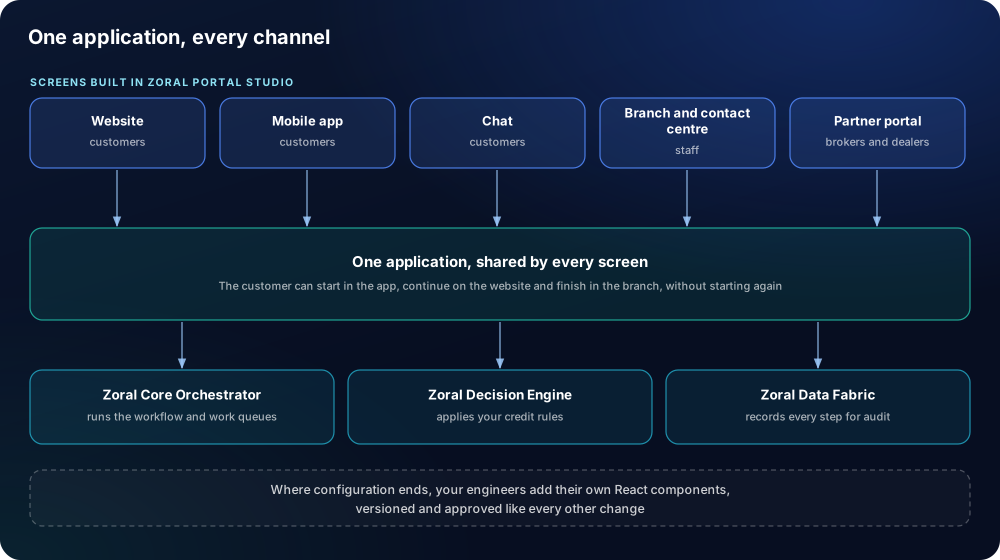
Zoral Portal Studio is where your teams build the screens for customers, staff and partners: website, mobile app, chat, branch and contact centre, and broker or dealer portals. It is part of the Zoral Finance Operating System (fOS).
Every screen works on the same application, with the same workflow, credit rules and audit trail. A customer can start in the app, continue on the website and finish in the branch, without starting again.
Your digital and product teams can:
- lay out screens and steps visually, starting from ready solution screens rather than a blank page;
- pre-fill what the bank already knows, so customers type less;
- check entries as the customer types, such as an address or an identity document;
- test two versions of a journey and keep the one that works better;
- see what a change affects before it goes live.
Simple on the surface
The best screen asks the customer for as little as possible. The work belongs underneath: the data lookups, the checks, the credit decision and the workflow. Zoral Portal Studio keeps the screen simple because Zoral fOS does that work behind it.
Open to your engineers
Where configuration ends, your engineers add their own React components. They can extend screens your design tools produce, or connect applications your bank already has. Their changes are versioned and approved like every other change.
Testing and control
Every change to a screen is versioned. It is tested in a test environment before it reaches customers. A second person approves it, and it can be reversed. Every customer interaction is recorded in the same audit trail as the decision behind it.
Where it fits
Zoral fOS has one centre. Zoral Data Fabric remembers every application, decision and change. Zoral Decision Engine makes every decision. The Business Outcomes Layer measures every result against plan. Around that centre, the other components do the work. Every Zoral solution reaches out from it into a product or a channel, and draws on the same data, rules and measurement. So each new product costs less to launch, and starts smarter, than the last.
Zoral Portal Studio sits around the centre. It works most closely with Zoral Core Orchestrator, Zoral Decision Engine and Zoral Data Fabric.


 +44 20 3963 2002